HyperText Markup Language (HTML)
In 1989 Hypertext Markup Language(HTML) was defined. HTML is the standard for formatting text
and images to create what is now commonplace - Web pages. HTML defines a number of tags that can be used
to modify the appearance of text and to load, size and position images.
One of the most important features of HTML was an addressing scheme for linking to resources - still
commonly called the Universal Resource Locator or URL. An example of a URL is
https://www.smallbusinessadvice.org.uk/index.html.
URL's cvan be written into Web pages, creating links to other pages and/or images, located on other Web
Servers located anywhere on the Internet.
HTML and URLs provided the means to develop a new type of information server. The pages on such a server
could be linked to pages on other servers, and each of those pages linked to other servers and so on.
This mesh of links between servers and HTML pages forms a web - hence the term World Wide Web(www).
The real power of the Web is the way a user can connect to a Web page and by using the mouse, click on links
and travel from server to server, unaware of the geographic location of any of the servers!
Unfortunately, although HTML, URL and other server facilities were available, it was not easy for the
average user to access the embryonic Web and development was slow.
2.2 Web Browsers
 In 1994 Netscape released the first commercial Web Browser.
Netscape Navigator could access, and display HTML formatted pages across the Internet. It enabled
users to access a page, use point and click navigation, linking from page to page, server to server -
"surfing the Web".
In 1994 Netscape released the first commercial Web Browser.
Netscape Navigator could access, and display HTML formatted pages across the Internet. It enabled
users to access a page, use point and click navigation, linking from page to page, server to server -
"surfing the Web".
Coming as it did at the same time as the massive increase in PC numbers, this Browser unleashed the
potential of the Internet and the World Wide Web. In the space of 12 months millions of users around
the world had acquired a Browser!
The Web Browser market generated huge demand for Internet access and a market for new services.
The Browser, being based on HTML standards for presentation was independent of the underlying computer
operating system and Browser versions were released for Windows, UNIX, Macs etc.
 Microsoft were slow to recognised the threat to their market and had to invest heavily in Internet Explorer development, and use
the expensive tactic of supplying Internet Explorer as free software to recover market share from Netscape.
Microsoft were slow to recognised the threat to their market and had to invest heavily in Internet Explorer development, and use
the expensive tactic of supplying Internet Explorer as free software to recover market share from Netscape.
Today's Browsers are complex, functionally rich products compared with the first versions but they still
retain the key attributes of the original Browser. If a Web Page uses standard HTML then any modern Browser
on any computer, should be able to display it correctly. This flexibility is essential where the identity
of visitors to a Web Site is unknown and service providers cannot dictate user software choices.
Another important impact of Browser development has been the enabling of new approaches to business. For
instance it is possible to build business applications using Web technology to replace conventional
solutions and gain the benefits of web working - mobility of users, flexible user access, efficient
networking, and easily maintained solutions. As a result, Web technologies are infiltrating all aspects
of business.
It is worth just clarifying the positioning of the Internet and the WWW. The Internet is a computer
network dedicated to transmitting information from one place to another. The WWW consists of thousands of
 Web servers connected to the Internet and using it for communications with users and other servers.
In effect, the WWW runs "on top" of the Internet. Web Servers are developed to accept requests for
resources from the Internet - which means the server has no understanding of the location of the
visitor - in the same building or across the world!
Web servers connected to the Internet and using it for communications with users and other servers.
In effect, the WWW runs "on top" of the Internet. Web Servers are developed to accept requests for
resources from the Internet - which means the server has no understanding of the location of the
visitor - in the same building or across the world!
2.3 Domain names

The Internet uses a numeric numbering scheme to address computers, services, users etc.
These numeric addresses are similar to telephone numbers e.g. 194.200.345.78. They are usually shown
in this dot notation form. So how do users and services make logical connections based on names such as
"www.bbc.co.uk"? This is the role of the Internet Domain Name Service(DNS).
When a Web service is developed it requires an Internet address and a Domain Name in so that users
can access it. Domain names must be registered with one of the Internet domain authorities. The Domain
name registration process ensures that there are no duplicates, allocates a physical address to the Domain
and adds the name into the worldwide Domain Name Service.
A domain address is structured along the lines of a postal address but each "line" of the address is separated
by dots for instance "31.high-street.town.city.uk". The domain-naming scheme has been designed to operate on
a global basis with several top level domain names - usually country codes.
Each top-level domain - for instance "uk" has a name registration authority responsible for all domain names
below the overall index.
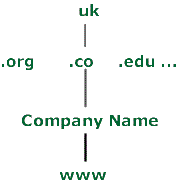 Below each top level domain are several grouping domains defining types of addresses for instance .co defines
commercial sites, .org defines non-profit making and .ac defines academicl sites.
Below each top level domain are several grouping domains defining types of addresses for instance .co defines
commercial sites, .org defines non-profit making and .ac defines academicl sites.
Within each of these type domains users can apply for and register domain names. When a name is registered
the naming authority checks to make sure there are no duplicates and then inserts the address and name
into the Domain Name Service. The Domain Name Service consists of thousands or servers around the world,
sharing address information. When your domain name is input to the DNS it is promulgated across the
Internet in a few hours - quickly enabling Global access to your Web site from anywhere in the world.
2.4 Internet Email
Electronic mail is one of the oldest and most successful Internet applications but its uptake was limited
by the technical nature of the Internet. With the creation of the World Wide Web(WWW) the number of
Internet users rocketed and these users wanted access to some form of message service.
The big breakthrough in mass Email usage came with the Web Browsers as these incorporated Email client
programs as standard so people could dial the Internet, login to their mailbox and send/receive Email.
Internet Mail is dependent (like the Internet itself) on a standard addressing scheme. The Internet Mail
address standard is now quite familiar - often seen on TV and in newspapers.
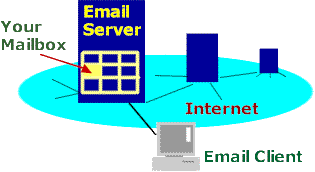
The basic principle is that each user owns a mailbox where their Email is stored and each mailbox belongs to a domain address.
To make use of email a user has to obtain an Email address. This can be done via one of the big Internet
services such as Hotmail or Freeserve who provide free Email! (See Get Email now!)
To send an email just enter the address of the recipient, add the subject and message and Send. Your Email
client program uses the Internet to send your message to the target address (domain).
When it arrives, the receiving Email service locates the recipient mailbox by name e.g. "john_smith"
and stores the message in the mailbox - usually in a folder called "Inbox" or similar. When the recipient
next connects to the Internet and checks their mail they are advised that a new message is available and
it is downloaded from the Internet Email Server to their local machine.
Because Internet Email is moved from server to server and stored in the recipients mailbox awaiting their
collection it is both reliable and flexible. Email can be sent from different time zones to your mailbox but you
can process during local office hours - ideal for collecting information, feedback or even orders from a
Web Site!
The important features of Internet mail are;
It is easy to obtain an Email address and mailbox
Easy to learn and use
Low cost - local telephone call to send to anywhere in the world.
Transmission across the Internet is reliable
Emails can include file attachments e.g. Word Docs.
Messages are stored in your mailbox until you collect them.
Any Internet Email user can communicate with you/your business
Internet mail is now the world standard for Email, replacing many older, incompatible standards, enabling
people around the globe to communicate easily at low cost.
Another powerful use of Email is as a Service-to-User information link. The smallbusinessadvice service
uses Email in this way, all emails sent to visitors and Advisers being generated automatically by the service.
To get your own Email account see Get Email Now!
2.5 Internet Service Providers
So far this guide has avoided one subject - cost!
Who owns the Internet - and who pays for it? The Internet actually consists of hundreds of networks
linked together. These networks are operated by different organisations. The Internet is a
layered organisation - at the center are the global telecoms organisations operating the highest
capacity "backbone" links with hundreds of smaller operators connected to each other and to the Backbone.
This mass of network connections, combined with Internet Addressing and routing enables any user to access
any service.
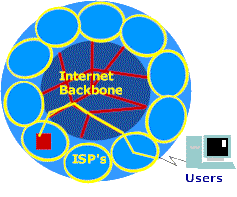 The smaller operators tend to interface directly to users - these are the Internet Service Providers(ISPs).
An ISP typically provides a user with a telephone access number, an account name and password.
To connect to the Internet the user first dials the ISP and supplies account and password information, the
ISP checks these details and if valid allows the user to connect into their network and onwards to the main
Internet.
The smaller operators tend to interface directly to users - these are the Internet Service Providers(ISPs).
An ISP typically provides a user with a telephone access number, an account name and password.
To connect to the Internet the user first dials the ISP and supplies account and password information, the
ISP checks these details and if valid allows the user to connect into their network and onwards to the main
Internet.
The ISP pays for interconnections to other ISP networks and the main Internet backbone, enabling users to send
and receive across the Global internet. The revenues that fund the Internet flow from the ISP's into the
other network operators.
The source of revenue for ISP's is country dependent. In the UK until recently the ISP's used a system of monthly
charges to provide users with internet access however, as a result of telecommunications deregulation, ISP's
were able to claim a percentage of the call charges generated by users accessing their services so a new
generation of ISP's introduced "free" services. These services were funded by telephone call revenues and
proved to be very popular - generating massive businesses for the likes of Freeserve.
Now these revenues are under threat as ISPs and telecommunications organisations are starting to offer free calls
to the Internet - so there are no charges to share between the ISP and telecommunications authorities! So far the packages
tend to be based on unlimited telephone access for a monthly fee but if access charges are completely
eliminated then ISP's will need to generate new revenues to pay for their Internet connections and these will
probably come from a mixture of advertising and new services.
The ISP market is a highly volatile and undergoing rapid change.
2.6 Internet Search Engines
The growth of the World Wide Web also generated a massive increase in information available to Web users
- located on Web Servers around the globe. The old Internet had several information search/retreival
schemes but these needed administrators to structure information and indexes to enable basic
searches. With the take-off of the WWW, information volumes were exploding and much of this information
was unstructured. A new approach was needed and this led to the development of the Internet Search Engine.
A search engine is a verylarge scale computer system connected to the Internet. It operates by linking to
web sites and reading through the available web pages identifying key words, titles etc.
These words are retrieved and stored in large, fast search indexes.
When a user connects to a search engine and enters a word or phrase, the search engine looks this word or
phrase up in its index and locates the "best" hits (locations where the word/phrase occurs. The list of
hits is displayed back to he user with a short description and a link field which the user can click to
make direct connection to the site - anywhere in the world!
The first search engines were tightly focused on search and retrieval but over the past two years there has
been an increase in the number of search engines and the type of service they provide. The largest search engines
include Altavista and Yahoo
These large search engine sites have developed into portal sites (gateways to other sites) - offering links to hundreds of categorised
sites. The large number of visitors they achieve has placed them amongst the highest Advertising earners.
Search engines can play a major role in the success of your Web Site/ebusiness service. Users looking for
products and services will often start with a Search Engine search for potential suppliers. In order to maximise
the business effectiveness of your Web site you need to register your site with the major Search Engines.
Search Engine registration involves submitting your Web server address, and in some cases classification
information, to the appropriate address at the search engine site.
Once your site address has been registered the search engines will schedule a scan of the site and add
your key words, titles etc. into their searchable indexes and/or categories.
There are several tricks that can be used to improve the position of your site in Search Engine
hit lists. the best source of information about the registration process, indexing techniques and how to
improve your hits is the Web itself. Look up "Search Engine registration" in Altavista and you will see that
there are many organisations providing services and information in this area. Some of these offer free
and automatic registration to the major Search Engines.
Note it can take a week or two before the search engine scan reaches your site but it is working across
the whole Internet so it can take some time!
2.7 Where do I start?
So now you understand the basic components and functions of the Internet and you want to get started!
Modems
Most new PC's are now delivered with integrated modems. If you don't have a modem then you will need to buy
one before you can connect to the Internet. The function of the modem is to convert your computer signals into
a form suitable for transmission over the telecommunications network.
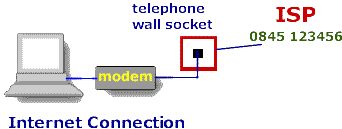
If you need to buy a modem make sure it is 56Kbps rated (this means it can received information from the
Internet at 56,000 "bits per second" or approximately 6,000 characters per second. Connect you modem to your
computer and start the computer - most systems will automatically recognise the new modem and configure it
for you.
Web Browser
Having made sure that you have a modem installed you should check your Browser status.
If you are running a reasonably modern PC (with 24Mb main memory or better) then you should consider loading
the latest Browser versions.
While the main Browsers can be downloaded at no charge they are large programs
and can take a long time to download. It is always worth checking the cover CD's of the latest Computer Magazines -
Microsoft and Netscape regularly release versions this way. Its a lot faster to load a CD than download a Browser and
you get to keep the CD and Computer Magazine!
Install or upgrade your Browser and reboot the machine.
Now you are nearly ready to connect! This is where your choice of ISP has to be made.
Select an ISP
There are many Internet Service Providers(ISPs) available to consumers in the UK, with a wide range of
services and price packages. You should decide what services you need - for instance Internet access and email account.
Do you plan to set up a web site in the near future? If so what Web space is available, at what charge? You
might plan to set all of your employees up with email addresses so you could need 10 addresses within a few
months. Check the email offerings of the ISP's.
A good way to check out ISP's is to review their service details via the Internet. Public Libraries often
offer Internet access via dedicated PCs - as do Internet Cafes.
Common features these days are national "low call" access numbers, telephone numbers that are always
charged at local rate - often using a dialling prefix of 0845. There are several alternatives to choose
from and one of the monthly Computer or Internet magazines will carry several advertisements.
One of the main sources of income for the "free" ISP's is their share of your telephone call charge when
accessing the Internet. The competition between suppliers continues to increase - there are now free call packages
starting to come onto the market! Although most of these packages impose conditions such as limiting free call times to weekends
and off peak, or requiring a monthly license payment for unlimited call time, they are more costs effective than existing schemes
and the signs are that the offers will get even better!
The chargeable ISP's tend to offer more exclusive services, for instance improved Web hosting and statistical
reporting, wider range of Email options perhaps more suited to business use, better user-to-modem ratios
meaning you enjoy easier connection etc.
To connect and set up an account on one of the free ISP services can be achieved in one of two ways. Either
install a CD from the service in question - this will set up you connection, dial the service, help you create
your account and then configure your Browser for the service. Another technique is to connect to the Internet
using a temporary account (perhaps borrow one from someone else), connect to the ISP of your choice and
once connected use their new account sign-up procedure.
The free ISPs will automatically offer to set up Email accounts for you. You may wish to use the ISP mail
or you could use one of the major free Email services such as Hotmail. Hotmail in particular is useful because
it operates on a global basis - easily accessible from Internet cafes around the world and from email programs
such as outlook Express and from a Browser (the Browser Email option means that you can send/receive mail
from any Browser without having to set up Email account information so it is very flexible and easy to use).
If you are using a chargeable ISP they will advise you of telephone numbers, account names and passwords and
you need to create a dial-up networking configuration and login settings to make your connection.
Tip when connecting to a free ISP or email service you will be asked to provide an account name. With so many
people already registered you will probably find that your name has already been used and that you are offered
something like [email protected]! It is worth experimenting with the underscore character. Not all services
support it but some do and the character is not widely used - you might find that john_smith is acceptable.
Now that you are connected to the Internet practice Browsing, using Search Engines and sending Email. All you
have to do now is let you friends/customers know your email address and you are in business!
Web Services
If you want to set up a basic Web site, many of the ISP's offer free space on their servers and will allocate you
a domain name within their own address space. This can be ideal for a basic advertising Web site for a small
business. Check your ISP's Web Service facilities through their services section (usually linked to their home
page). This will tell you the standards they support, for instance FrontPage. FrontPage is a Web Authoring
and editing package from Microsoft. It enables you to layout a page as you want to see it, using simple editing
tools similar to MS Word. As you layout text and images Frontpage is generating the HTML code in the background
and you can switch to the code for detailed editing.
most importantly when considering building a Web Site for yourself you should consider the opportunity cost
of learning and building - could you be making better use of your time to generate business rather than learning
something you may not use again! If your site is to be competitive it needs to present a professional image
and a specialist Web Design company can provide this quickly and economically.
We hope this guide has been useful. If you have any comments or questions please use the feedback form
at the top of the page. Your feedback helps us improve our services.
 Computer networks carry information from one point to another. The set of rules defining how information
must be formatted for sending and receiving (transmission) is called a protocol. Rules include the
language of text, where to place the address in a message, how long messages can be and so on.
Computer networks carry information from one point to another. The set of rules defining how information
must be formatted for sending and receiving (transmission) is called a protocol. Rules include the
language of text, where to place the address in a message, how long messages can be and so on.
 That is it converts "www.company.com"
to its unique numeric Internet Address and then works out how to reach that address across the Internet
- this is called "Routing".
That is it converts "www.company.com"
to its unique numeric Internet Address and then works out how to reach that address across the Internet
- this is called "Routing".